← All Projects Class Project · 380 · 2025–2026

Modular Spell
System Project

First-person mage game built in Unreal Engine 5.6.1 using Blueprints only. Focus is on a modular spell component system with elemental combos, scrollable spell selection, a full enemy hierarchy, and Niagara VFX integration.

Engine Unreal Engine 5.6.1
Role Systems Designer
Scripting Blueprints Only
Type Solo · Class Project
Status In Development
UE5.6.1 Blueprints Enhanced Input Niagara VFX Systems Design

// Gameplay

// Design Goal

A spell system built
to grow

The core objective was to build a spell system modular enough that new spells and combos can be added without touching existing logic. Each spell is fully self-contained — its own component, its own behavior, its own interactions.

The system is intentionally designed as a foundation. More spells, deeper combo chains, and more elaborate interactions are planned as development continues — the architecture is built to support that without rework.
Ongoing development

This project is actively in development. The current build demonstrates the core architecture — modular spell components, elemental combos, and the wall barrier as a cross-spell force multiplier.

Future iterations will expand the combo logic, add new spell types, and push the interaction depth further. The goal is a system where every spell has a reason to exist in relation to the others.

// Modular Spell System

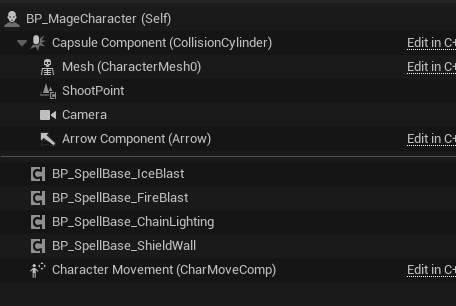
BP_MageCharacter component hierarchy showing spell components
BP_MageCharacter — spell components attached directly to character

One step to add a spell

Each spell is its own self-contained component — BP_SpellBase_IceBlast, FireBlast, ChainLighting, ShieldWall — attached directly to the character. They don't know about each other. They only know about their own logic.

Adding a new spell means creating a child of BP_SpellBase and dropping it onto the character. The scroll system automatically picks it up via Get Components By Class — no wiring, no registration, no edits to existing code.

This also makes combo interactions clean. IceBlast sets a flag on the enemy. Fireball checks that flag. Neither spell needs to reference the other directly — they just read shared state on the enemy.

// Spell Selection & HUD

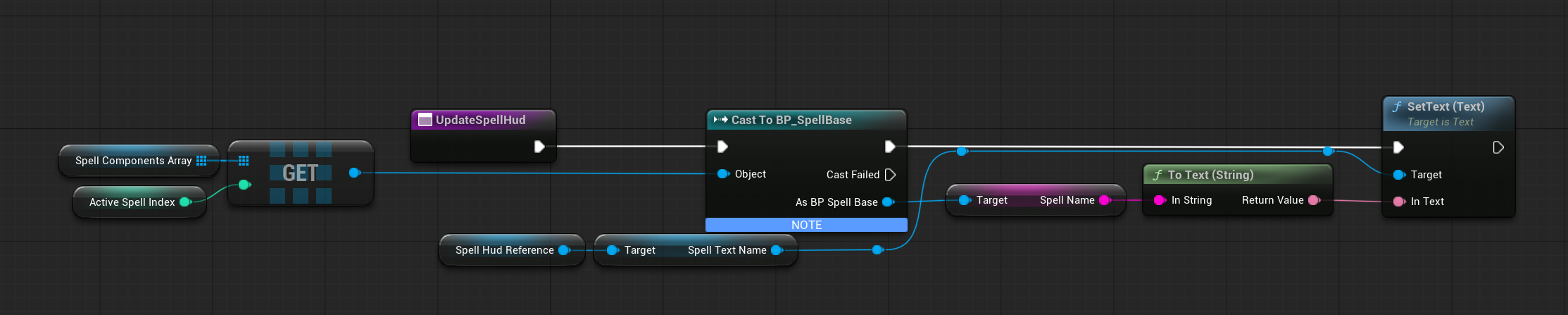
UpdateSpellHud Blueprint — spell index to HUD text
UpdateSpellHud — SpellComponentsArray GET → Cast To BP_SpellBase → Spell Name → SetText Spell Scroll System

Scroll wheel → active spell

The scroll wheel increments or decrements ActiveSpellIndex with wrap logic so it loops cleanly. On change, UpdateSpellHud fires — it GETs the component at that index from SpellComponentsArray, casts to BP_SpellBase to access the Spell Name property, and pushes it to the HUD widget.

The HUD always reflects exactly which spell is active with zero redundancy. No switch statements, no hardcoded names — the spell tells the UI what it is.

Scales automatically

Because the array is populated dynamically at runtime with Get Components By Class, the scroll system works for any number of spells without any changes. Add a fifth spell component and it appears in the rotation automatically.

This is the same pattern used in the combo system — spells are compartmentalized, each responsible only for its own behavior, and the character reads them generically rather than case-by-case.

// Chain Lightning — Full System

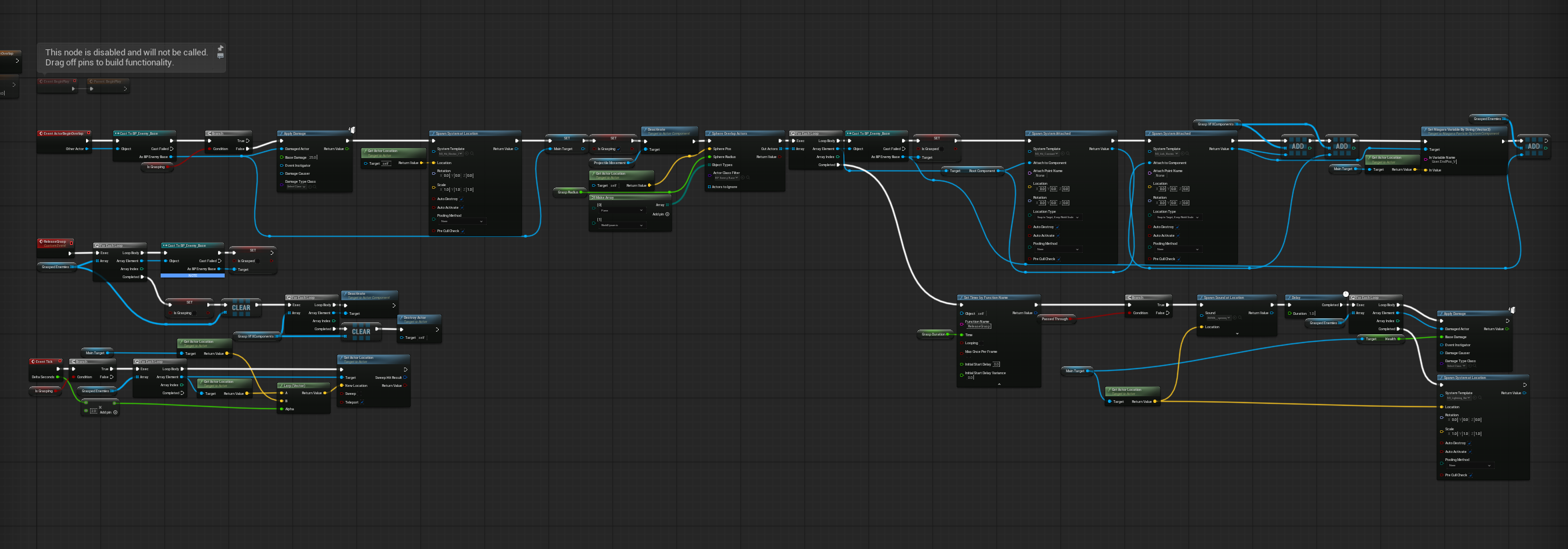
Chain Lightning Blueprint graph — full system
BP_Projectile_ChainLightning — hit detection, grasp system, VFX tracking, Event Tick pull, wall amplification Most Complex Spell

Grab, hold, and punish

On impact, the projectile runs a sphere overlap to find all nearby enemies and adds them to a GraspedEnemies array. Each grasped enemy gets a looping Niagara effect attached and tracked in GraspVFXComponents.

Event Tick runs a VLerp each frame that pulls all grasped enemies toward the anchor point — they physically slide in over time. When the spell ends, ReleaseGrasp iterates the VFX array and deactivates each component manually. AutoDestroy alone doesn't handle looping effects.

Cast through a barrier = execution

If the projectile passes through a BP_WallBarrier, a 2-second delay fires and then bonus damage equal to the main target's current health is applied to all grasped enemies — effectively halving them regardless of how much health they have.

This creates a high-risk, high-reward decision: place the wall first, then land the chain through it. The wall isn't just a blocker — it's a force multiplier for every spell in the kit.

// Spell Design

Spells are selected by scrolling through the active spell slot — the current spell displays in the bottom left HUD. All spells fire on Left Mouse, except the Wall Barrier which is instant-placed on F. Every spell has a mana cost and cooldown — the system is built, not yet tuned in the current demo build.

Spell
Effect
Wall Amplification
Fireball Scroll → Left Mouse
Line trace to impact point → radial AoE explosion with physics impulse. Primary damage dealer.
COMBO FINISHER: Ice → Fire = Explosion
Larger blast radius, increased damage.
Ice Blast Scroll → Left Mouse
Instakills slimes. Sets bIsFrozen on skeletons for 5 seconds, applying a bone-level material swap as visual feedback.
COMBO ENABLER: Freeze → Fireball
Slimes die the same. Skeletons freeze through the bones — blue tint through the skeleton material.
Chain Lightning Scroll → Left Mouse
Sphere overlap on impact grabs nearby enemies. Event Tick VLerp pulls them toward the anchor. Looping Niagara beams track each target.
2s delay → bonus damage equal to target's current health applied to all grasped enemies.
Wall Barrier F — Instant Placement
Box collision blocks enemies (Pawns), lets projectiles through (WorldDynamic). 10-second lifespan.
All spells cast through it are amplified. The wall is the force multiplier for the entire kit.

// Key Design Decisions

Architecture

Float mana over integer

Early builds used integer mana. Auto-regen ran on tick, adding fractional amounts each frame — but integers truncated the decimal, so regen effectively did nothing. Switching to float resolved it immediately. Small decision, non-obvious cause.

VFX

Manual VFX cleanup for looping effects

AutoDestroy on Niagara components doesn't stop looping systems — they keep running until explicitly deactivated. Chain Lightning tracks all active grasp VFX in a GraspVFXComponents array and iterates it on ReleaseGrasp to deactivate each one.

Projectiles

Early-exit cast check for wall pass-through

Every projectile's ActorBeginOverlap starts with a Cast to BP_WallBarrier. If it hits, exit early — don't destroy the projectile. This was added to each projectile class (Base, Fireball, IceBlast) as a targeted fix without changing shared logic.

Enemy Design

Override only what differs

BP_Enemy_Base handles health, damage, and death interfaces. Skeleton overrides just three functions: ApplyFreeze (material swap + flag), TriggerComboExplosion (Break Constraint on bone array), and Death (ragdoll). Slime overrides different ones. Shared logic is never duplicated.

← All Projects